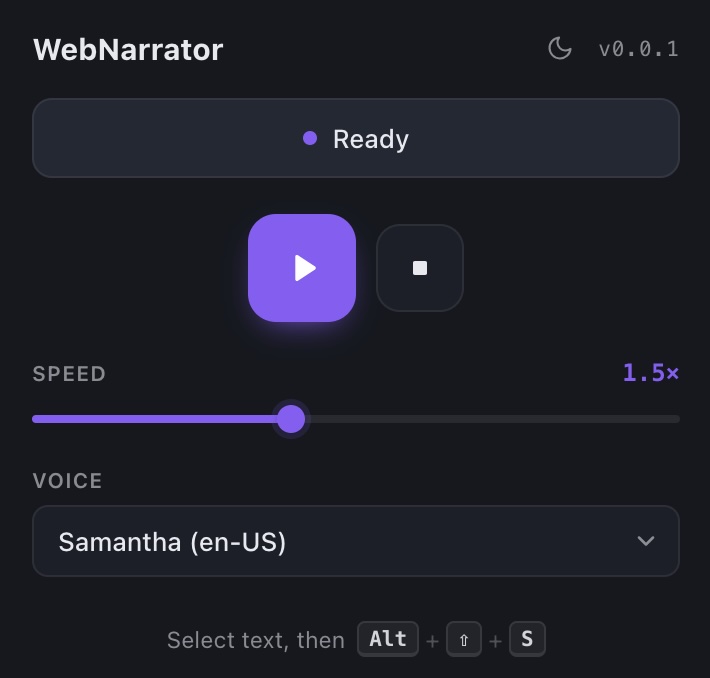
WebNarrator version 1.0.0
Hello world, today I’m launching WebNarrator, a free browser extension that reads any selected text aloud, with live word-by-word highlighting so you can follow along.
It works on Chrome and Firefox. There’s no signup, no server, no subscription, no tracking. All the text-to-speech happens locally in your browser using its built-in Web Speech API.
What WebNarrator Does
- Select any text on any webpage.
- Trigger WebNarrator by pressing Option+Shift+S (Mac) or Alt+Shift+S (Windows), right-click -> “Read selected text aloud”, or click the extension’s icon.
- Listen. WebNarrator highlights each word as it reads, auto-scrolling to keep it in view.
That’s it.
Features
- Live word highlighting. Each word is highlighted in yellow as it is spoken. If your browser’s TTS engine stops emitting word events mid-sentence, a timing-based fallback keeps the highlight moving.
- Speed control from 0.5× to 3×. Skim a long article at 2x speed. Slow dense content down to 0.5x speed.
- System voices. Every voice your operating system ships with shows up in the picker, including multilingual options.
- Play / pause / stop. Real pause-and-resume, not stop-and-restart.
- Keyboard-first. Option+Shift+S (Mac) or Alt+Shift+S (Windows) works from anywhere. No mouse required.
Why it’s different
- Zero network calls. The extension doesn’t include any analytics, telemetry, or external services. Check the manifest, it only asks for
contextMenus,storage, andscripting, plus host access so it can run on the pages you choose. See the privacy policy for a full breakdown. - No account. There’s nothing to sign up for. There’s nothing to sign into. It’s an extension.
Install
Feedback
I built WebNarrator to solve my own problem. I find it helpful, hopefully you will too. Questions & feedback welcome, you can join my discord or email me david@linkidex.com. No soliciting.